

Discover Function
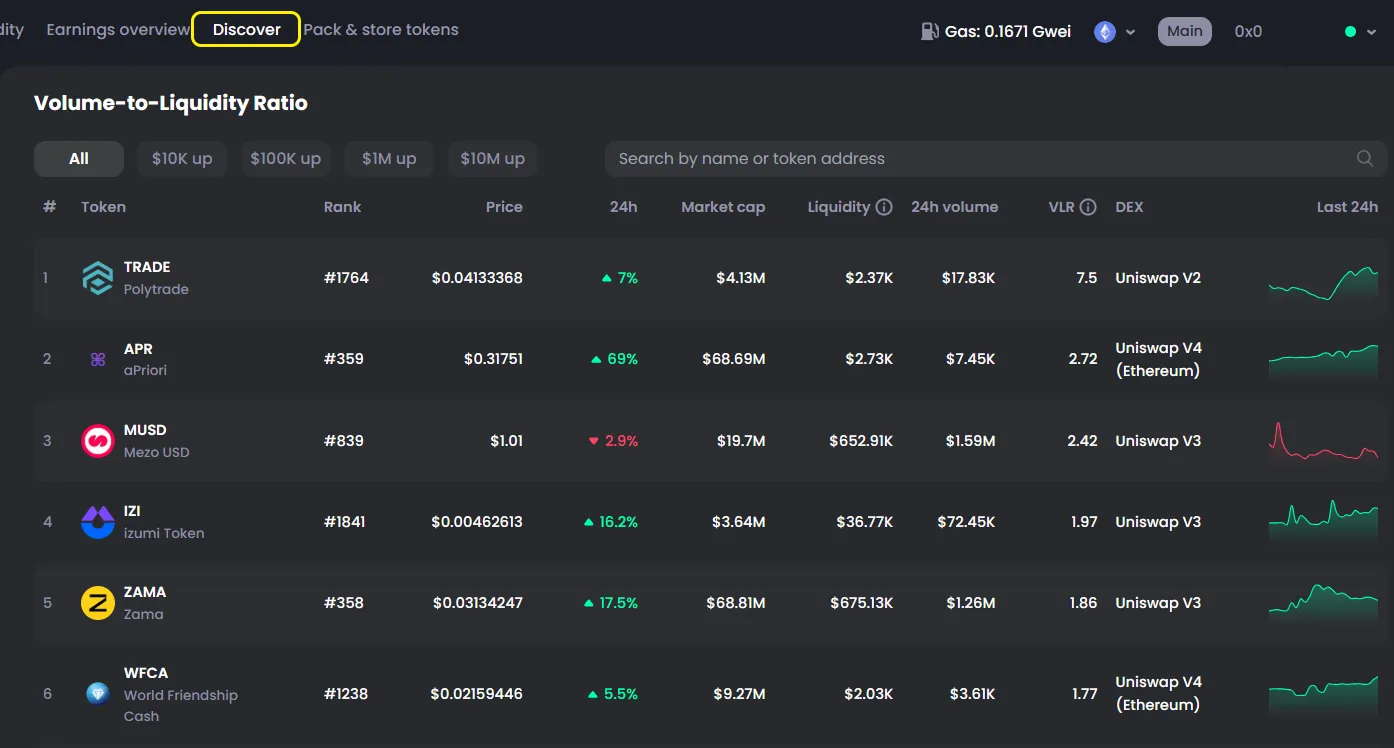
How to Use Discover
- Go to the Discover tab
- Browse project information
- Filter projects by volume:
- $10,000+
- $100,000+
- $10,000,000+
- Or use the search bar to find a project by name or token address
What is Discover?
Discover helps users find and compare tokens that may have liquidity opportunities on CoinPool.
The main focus of this page is the Volume-to-Liquidity Ratio. This ratio compares a token’s 24h trading volume with its available liquidity. It helps users see which pools are getting strong trading activity compared with their liquidity size.
On Discover, users can check key market data such as token price, 24h price change, market cap, liquidity, 24h volume, DEX, and the last 24h chart.
This function is useful for researching tokens before adding liquidity. A higher ratio may show more trading activity and possible fee opportunities, but it can also mean higher risk. Users should always review the token, pool liquidity, price movement, and project information before making a decision.
Data is collected from sources like:
- Explorer
- CoinGecko
- Uniswap
- GoPlus